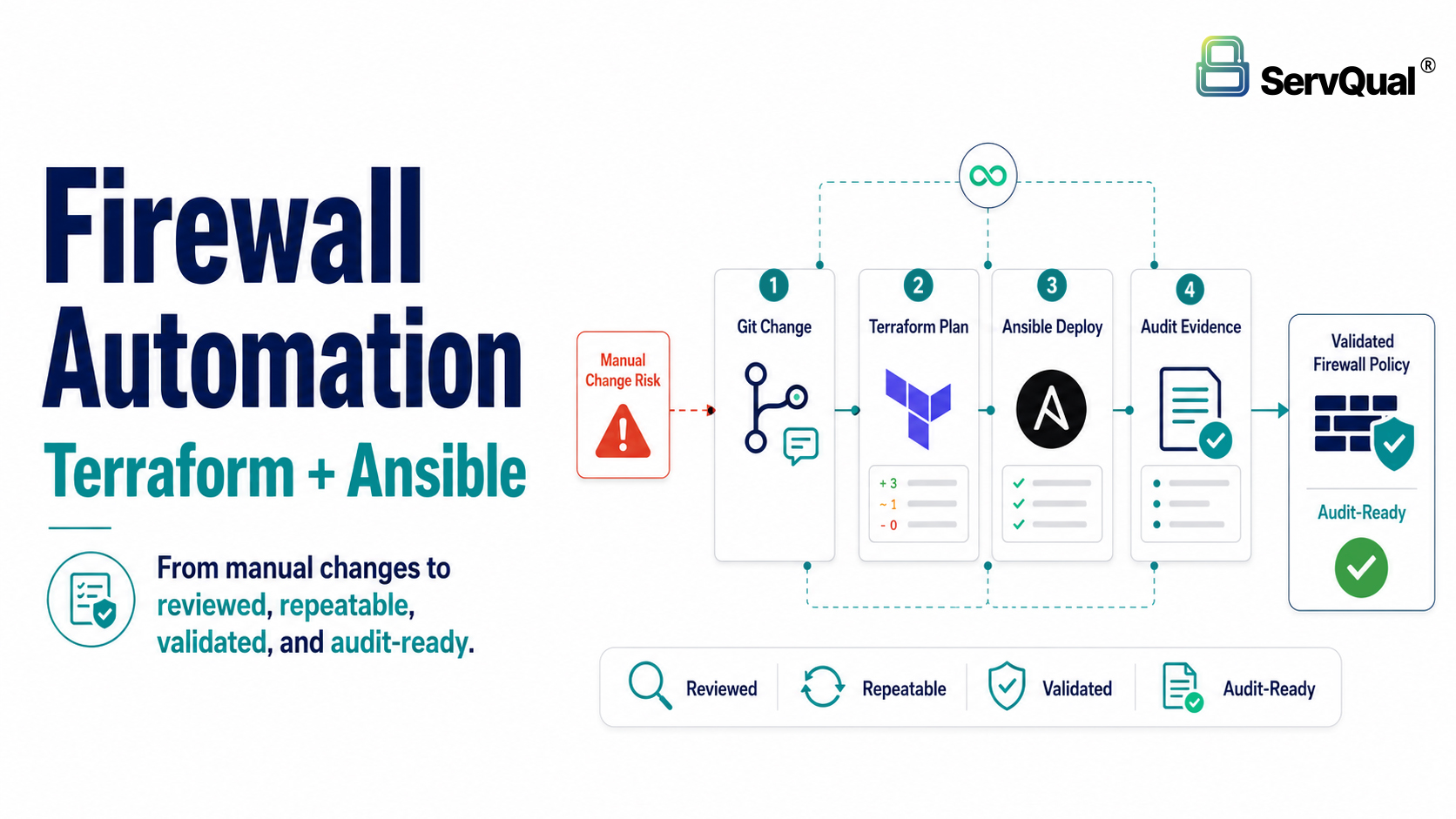
Automating firewall rules with Terraform and Ansible helps network and security teams manage firewall policy as code. Terraform is useful for provisioning firewall infrastructure, interfaces, routes and cloud network resources, while Ansible is useful for applying firewall objects, security rules, NAT, VPN, logging profiles and day to day configuration.
A mature firewall automation workflow uses Git for version control, pull requests for review, CI/CD pipelines for validation, Terraform plan for change preview, Ansible playbooks for policy deployment, automated backups, drift detection, rollback procedures and audit ready evidence for every change.
Executive Summary
Manual firewall changes do not scale in modern enterprise networks. As organizations add sites, cloud environments, business units and compliance obligations, firewall rule bases grow across many devices and platforms. Manual updates increase the risk of typos, inconsistent policies, undocumented exceptions and audit gaps.
Infrastructure as Code helps solve this by treating firewall configuration as reviewed, version controlled and repeatable code. Rules, objects, NAT policies, VPN tunnels and logging profiles can be stored in Git, reviewed through pull requests and deployed through automated pipelines.
Terraform and Ansible solve different parts of the problem. Terraform is strong for provisioning infrastructure and tracking desired state. Ansible is strong for configuration management, playbooks and day to day policy deployment. Used together, Terraform can build the firewall foundation, while Ansible can configure how the firewall behaves.
This article explains how Terraform, Ansible, Git and CI/CD can reduce firewall change risk, improve consistency, support audit readiness and help network, security and operations teams collaborate through a repeatable automation workflow.
Why Manual Firewall Changes Create Risk
Firewalls are simple to manage when a network is small. A single pair of devices, a handful of subnets and a short list of rules can be maintained by hand. That model breaks down quickly. As an organization adds sites, cloud environments, business units and compliance obligations, the rule base grows into thousands of entries spread across many devices. Each manual change carries the risk of a typo, a shadowed rule or an undocumented exception that nobody remembers making.
Common problems with manual firewall changes include:
- Human error: a mistyped address or wrong zone can expose a service or break production traffic.
- No reliable history: change tickets rarely match what was actually configured on the device.
- Slow delivery: coordinating changes across many firewalls by hand does not scale.
- Inconsistency: two engineers solve the same problem in two different ways.
- Difficult audits: proving who changed what, and why, becomes a manual investigation.
Why Infrastructure as Code Matters for Firewall Management
Infrastructure as Code (IaC) treats firewall configuration the same way software teams treat application code. Rules, objects and policies are described in text files, stored in version control, reviewed by peers and deployed through repeatable pipelines. The device configuration becomes the output of a process rather than the result of ad hoc console sessions.
Benefits of automation in enterprise environments include:
- Consistency across every device and every environment.
- Faster, safer changes with review and testing before deployment.
- A complete audit trail that maps every change to an author and an approval.
Easier recovery, because a known good configuration can be redeployed on demand.
What Is Infrastructure as Code?
Infrastructure as Code is the practice of defining and managing infrastructure through machine readable definition files rather than manual configuration. For a network team, this means firewall zones, interfaces, address objects and security rules are written as code, committed to a repository and applied by tools instead of typed into a management console.
Why Network Teams Are Adopting IaC
Network and security teams face the same pressures that pushed server and application teams toward automation years ago: more systems, faster change requests and stricter compliance. IaC gives these teams a single source of truth and removes the guesswork about what a device should look like.
Manual Firewall Configuration vs Code-Based Configuration
The table below compares manual firewall configuration with code-based configuration.
| Aspect | Manual Configuration | Code-Based Configuration |
|---|---|---|
| Source of truth | The live device | The repository |
| Change record | Tickets and memory | Commit history |
| Repeatability | Re-typed each time | Re-applied identically |
| Review | Informal or none | Pull request review |
| Recovery | Restore from backup | Redeploy from code |
Version Control and Repeatable Deployments
When configuration lives in a version control system such as Git, every change is dated, attributed and reversible. The same definition can be applied to a lab, a staging network and production without rewriting anything, which is what makes deployments predictable.
Understanding Terraform for Firewall Automation
Terraform is an open source provisioning tool that builds and manages infrastructure through declarative configuration. You describe the desired end state and Terraform works out the actions needed to reach it.
Declarative Configuration Model
In a declarative model you state what should exist rather than the sequence of commands to create it. If a firewall instance and two interfaces are declared, Terraform ensures they exist. If they already match, it does nothing.
Terraform Providers, State Files, Plan and Apply
Providers
A provider is a plugin that lets Terraform talk to a specific platform or API. Cloud providers expose network and firewall resources, and several firewall vendors, including Palo Alto Networks and Fortinet, publish providers so policies can be managed directly through Terraform.
State Files
Terraform records what it manages in a state file. This file maps your configuration to real resources so Terraform knows what to create, change or leave alone. State is sensitive and should be stored in a shared, encrypted backend rather than on a laptop.
Planning and Applying Changes
The core workflow has two steps. Terraform plan shows exactly what will change before anything happens. Terraform apply carries out the approved changes. This preview step is a major safety feature for network work.
Managing Firewall Policies Through Terraform
A short example that declares an address object and a security rule through a firewall provider:
|
resource “firewall_address_object” “web_srv” { name = “SRV-WEB-01” type = “ip-netmask” value = “10.20.10.5/32” }
resource “firewall_security_rule” “allow_web” { name = “ALLOW-WEB-INBOUND” source_zones = [“untrust”] destination_zones = [“dmz”] destination_addr = [firewall_address_object.web_srv.name] applications = [“ssl”, “web-browsing”] action = “allow” log_end = true } |
Understanding Ansible for Firewall Automation
Ansible is an open source automation tool used for configuration management and deployment. Where Terraform is strong at building infrastructure, Ansible is strong at configuring what runs on it.
Agentless Architecture
Ansible does not require software to be installed on the managed device. It connects over SSH or a device API and pushes configuration. For firewalls, this usually means calling the vendor management API, which keeps the devices clean of extra agents.
Ansible Playbooks, Inventory and Firewall Modules
YAML Playbooks
Instructions are written in playbooks using YAML, a readable text format. A playbook lists tasks, and each task calls a module that performs one action, such as creating an address object or a security rule.
Inventory Management
An inventory lists the devices Ansible manages, grouped by role, region or environment. Grouping lets the same playbook target a single lab firewall or an entire production fleet.
Modules for Firewall Automation
Modules are the building blocks that do the work. Major vendors, including Cisco, Palo Alto Networks, Fortinet and Check Point, publish collections of firewall modules for objects, rules, NAT and routing. A short playbook example:
|
– name: Configure DMZ web access hosts: edge_firewalls connection: local gather_facts: false tasks: – name: Create address object vendor.firewall.address_object: name: “SRV-WEB-01” value: “10.20.10.5/32” state: present – name: Apply security rule vendor.firewall.security_rule: name: “ALLOW-WEB-INBOUND” source_zone: “untrust” dest_zone: “dmz” action: “allow” state: present |
Configuration Management vs Provisioning
Provisioning creates resources that did not exist. Configuration management maintains the settings inside resources that already exist. Terraform leans toward provisioning, and Ansible leans toward configuration management, which is why many teams use both.
Terraform vs Ansible for Firewall Automation
Both tools automate infrastructure, but they solve different problems. The table below summarizes the practical differences.
| Criteria | Terraform | Ansible |
|---|---|---|
| Purpose | Provision and manage infrastructure | Configure and manage existing systems |
| Configuration style | Declarative (HCL) | Mostly procedural tasks (YAML) |
| State management | Maintains a state file | Stateless, checks live state each run |
| Idempotency | Built in through state and plan | Per module, depends on the module |
| Best use cases | Building firewalls, interfaces, routing, cloud networks | Applying policies, objects, NAT, VPN, profiles |
| Learning curve | Moderate, state concepts take time | Gentle, readable YAML |
| Enterprise usage | Common for cloud and device provisioning | Common for policy and day to day config |
| Strengths | Clear plan preview, strong drift tracking | Agentless, wide module library, simple syntax |
| Limitations | State handling adds operational care | No single state view of the whole estate |
Why Use Terraform and Ansible Together?
The tools complement each other. A common and reliable pattern is to let Terraform build the foundation and let Ansible configure the security policy on top of it. A typical workflow runs in order:
- Terraform provisions infrastructure: firewall instances are created in the cloud or data center.
- Interfaces are configured: management and data interfaces, plus zones, are set up.
- Routing is deployed: virtual routers and static or dynamic routes are established.
- Ansible applies security policies once the base is ready.
- Objects and address groups are created for reuse across rules.
- Security rules are pushed to control allowed and denied traffic.
- NAT policies translate addresses for inbound and outbound flows.
- VPN configuration establishes site-to-site or remote access tunnels.
- Logging profiles are attached so traffic is recorded correctly.
- High availability settings are applied to keep the pair synchronized.
This split keeps responsibilities clear. Terraform owns what the firewall is, and Ansible owns how it behaves.
Firewall Configuration That Can Be Automated
Almost every element of a modern firewall exposed through an API can be automated. Common examples include:
| Network and Routing | Security Policy | Threat and Content |
|---|---|---|
| Interface configuration | Security policies | IPS policies |
| Zone configuration | Address objects | Antivirus profiles |
| Virtual routers | Address groups | Anti-spyware profiles |
| Static routes | Service objects | File blocking |
| Dynamic routing | Application groups | URL filtering |
| NAT rules | User-ID integration | DNS security |
| VPN tunnels | QoS policies | Sandbox profiles (vendor specific, for example WildFire) |
| SSL VPN configuration | HA configuration | Logging configuration |
| Scheduled backups |
Example Enterprise Automation Workflow
A mature pipeline moves a change from a proposal to a verified deployment without anyone logging into the firewall directly. Step by step:
- An engineer updates the Git repository with the intended change.
- A pull request is created to propose the change.
- Peers perform a code review of the diff.
- The change is approved by a reviewer or change board.
- The CI/CD pipeline starts automatically on merge.
- Terraform plan runs to preview infrastructure changes.
- Validation checks confirm syntax, policy and standards.
- Terraform apply provisions or updates the infrastructure.
- Ansible playbooks execute to apply security policy.
- Firewall configuration is verified against expected state.
- Logs are generated for the entire run.
- A compliance report is produced for the record.
- If validation fails at any stage, the change is rolled back.
Git Integration for Firewall Change Control
Git is the backbone of the workflow. It stores the configuration, records history and coordinates the team.
- Version control: every configuration state is saved and retrievable.
- Branching strategy: work happens on feature branches, protecting the main line.
- Pull requests: changes are proposed and discussed before merging.
- Code review: a second set of eyes catches mistakes early.
- Change history: each commit shows what changed and why.
- Rollback: reverting to a previous commit restores a known good state.
- Audit trail: author, time and approval are recorded for every change.
- Team collaboration: network, security and operations work from one repository.
CI/CD Pipeline Stages for Firewall Automation
A continuous integration and delivery (CI/CD) pipeline runs the tools automatically and enforces the gates. It integrates with common platforms such as GitHub Actions, GitLab CI, Jenkins and Azure DevOps. A typical pipeline has these stages:
| Stage | What It Does |
|---|---|
| Validate code | Check syntax and formatting for Terraform and Ansible. |
| Security checks | Scan for exposed secrets and risky rule patterns. |
| Terraform plan | Produce a preview of infrastructure changes. |
| Approval | Require a human or change board sign-off. |
| Deployment | Run Terraform apply and Ansible playbooks. |
| Verification | Confirm the firewall matches the intended state. |
| Notification | Post results to chat, email or a ticket. |
Security Best Practices for Firewall Automation
Automation concentrates power in a pipeline, so the pipeline itself must be secured.
- Least privilege access: give each account only the permissions it needs.
- Secure storage of credentials: never keep passwords or keys in the repository.
- Secret management: use a dedicated vault or secrets manager for sensitive values.
- API key protection: rotate keys and scope them to specific tasks.
- Multi-factor authentication for anyone who can trigger deployments.
- Role-based access control (RBAC) for repositories and pipelines.
- Code review before deployment, with no direct commits to production branches.
- Change approval that ties every deployment to an authorized request.
- Logging every deployment for accountability.
- Automated backup before changes so recovery is always possible.
- Configuration validation to catch errors before they reach devices.
- Drift detection to flag manual changes made outside the pipeline.
Documented rollback procedures that are tested, not assumed.
Common Firewall Automation Mistakes
Teams that are new to firewall automation tend to repeat the same avoidable mistakes:
- Editing the firewall manually after automation, which causes drift.
- Ignoring Terraform state, leading to conflicts and duplicate resources.
- Hardcoding passwords or API keys in code.
- Poor documentation that leaves the next engineer guessing.
- Missing backups before a change is applied.
- No testing environment, so production is the first place a change runs.
- No rollback strategy when a deployment fails.
- Inconsistent naming conventions that make objects hard to trace.
- Large, unreviewed deployments that hide risky changes.
Lack of logging, which makes incidents hard to investigate.
Post-Deployment Monitoring for Firewall Automation
Deployment is not the end of the process. Ongoing monitoring confirms that the change worked and that the device stays healthy. Watch for:
| Deployment Health | Device and Traffic Health |
|---|---|
| Policy deployment status | Firewall health status |
| Configuration drift | CPU and memory usage |
| Failed playbooks | Session count |
| API failures | HA synchronization state |
| Log generation | VPN tunnel status |
| Compliance verification | Overall availability |
Enterprise Firewall Automation Best Practices
Organizations that scale firewall automation successfully tend to follow these practices:
- Write modular Terraform code so components can be reused.
- Build reusable Ansible roles for common policy patterns.
- Adopt standard naming conventions across all objects and rules.
- Separate environments for Dev, Test and Production.
- Use Git based workflows for every change.
- Require peer review before merge.
- Add automated testing to the pipeline.
- Keep documentation current alongside the code.
- Take regular backups on a schedule.
- Run periodic audits of rules and access.
- Schedule compliance checks rather than running them only on demand.
- Integrate with formal change management processes.
Real-World Firewall Automation Use Cases
The table below highlights common scenarios where firewall automation delivers clear value.
| Use Case | How Automation Helps |
|---|---|
| New branch office deployment | A standard template builds identical firewalls in hours, not days. |
| Cloud firewall deployment | Terraform provisions cloud firewalls consistently across accounts. |
| Disaster recovery site | The DR firewall is redeployed from code to match production. |
| Firewall replacement | Configuration is reapplied to new hardware from the repository. |
| Policy standardization | One reviewed rule set is pushed across the whole fleet. |
| Multi-region deployments | The same code runs per region with small variable changes. |
| Large compliance projects | Every change carries a report and an audit trail. |
| MSP-managed customer firewalls | Templates let a provider manage many tenants safely. |
Firewall Automation Checklist
Organizations automating firewall rules with Terraform and Ansible should validate the following:
- Store firewall configuration in a version-controlled repository such as Git.
- Use feature branches and pull requests for every firewall change.
- Require peer review before merging changes to production branches.
- Use Terraform plan to preview infrastructure or firewall object changes before applying them.
- Store Terraform state in a shared, encrypted backend with controlled access.
- Use Ansible playbooks or roles for repeatable firewall policy deployment.
- Store secrets in a vault or secrets manager, never directly in code.
- Restrict pipeline permissions using least privilege and RBAC.
- Require MFA for users who can approve or trigger production deployments.
- Run automated syntax, policy and standards checks before deployment.
- Create automatic backups before firewall changes are applied.
- Validate deployed configuration against the expected state.
- Detect and investigate manual configuration drift outside the pipeline.
- Log every deployment, approval, failure and rollback.
- Maintain rollback procedures and test them regularly.
Map firewall automation evidence to change management, compliance and audit readiness requirements.
How ServQual and SUSAN Help
ServQual helps organizations strengthen network security, firewall governance, DevSecOps, infrastructure automation, cloud security, incident response and GRC readiness.
Firewall automation should not only make changes faster. It should make changes safer, more consistent and easier to evidence. Terraform, Ansible, Git and CI/CD pipelines can reduce manual error, but they also need governance, approval, monitoring and audit visibility.
SUSAN can help teams connect firewall automation findings, remediation ownership, control evidence and audit readiness into a structured governance view. This helps network, security, DevSecOps and GRC teams track whether firewall changes are reviewed, approved, deployed, validated and evidenced.
With ServQual and SUSAN, organizations can:
- Review firewall automation readiness
- Identify manual change and drift risks
- Track firewall automation remediation actions
- Support audit-ready evidence for change management
- Connect firewall findings with GRC and compliance workflows
- Improve visibility across network, security and DevSecOps teams
- Maintain evidence for firewall policy review and deployment history
- Move from ad hoc firewall changes to continuous assurance
Explore Cybersecurity Services: https://srql.com/services/cyber-security-solutions/
Explore Secure by Design: https://srql.com/services/secure-by-design/
Explore Governance, Risk, Compliance & Audits: https://srql.com/services/governance-risk-compliance-audits/
Explore SUSAN: https://srql.com/services/susan/
"Firewall automation should not only make changes faster. It should make every change reviewed, repeatable and evidenced."

Rohan Kanthe
Sr. IT Engineer | ServQual
FAQ
Most frequent questions and answers
Automating firewall rules means defining firewall objects, policies, NAT, VPN, logging and related settings as code, then deploying them through repeatable tools and controlled workflows instead of manual console changes.
Terraform helps provision and manage firewall infrastructure, interfaces, routes, cloud network resources and provider-supported firewall objects through declarative configuration and state tracking.
Ansible helps apply firewall configuration using readable YAML playbooks, inventories and vendor modules. It is useful for policies, address objects, NAT, VPN settings, profiles and day to day configuration tasks.
Yes, many teams use Terraform to build the firewall and network foundation, then use Ansible to apply security policy and configuration on top of it.
Git provides version control, change history, rollback capability, peer review and audit evidence for firewall configuration changes.
Drift occurs when the live firewall configuration changes outside the automation workflow, causing the device state to differ from the code repository or expected state.
A firewall automation pipeline should include syntax validation, security checks, Terraform plan, approval, deployment, verification, notification, logging and rollback handling.
Secrets such as passwords, API keys and tokens should be stored in a vault or secrets manager, not in Git repositories or playbook files.
Firewall automation supports audit readiness by creating a traceable record of who changed what, when it was reviewed, when it was deployed, what was validated and how rollback would occur.
SUSAN can help teams connect firewall automation findings, remediation ownership, control evidence and audit readiness into a structured GRC and continuous assurance workflow.
Automate Firewall Changes Without Losing Governance
Manual firewall changes create risk through inconsistent rules, weak documentation, configuration drift and missing audit evidence. Terraform, Ansible, Git and CI/CD can help network and security teams move toward repeatable, reviewed and validated firewall policy deployment.
ServQual can help assess your firewall change process, identify automation readiness gaps, review governance controls and design safer workflows for firewall policy deployment. Explore ServQual Cybersecurity Services or contact ServQual to connect firewall automation, change management, drift detection, remediation ownership and audit-ready evidence into one continuous assurance model.
Disclaimer: This article is provided for general informational purposes only and does not constitute technical, legal, security or compliance advice. Firewall automation should be implemented in line with your organization’s specific architecture, risk profile, change management policies and regulatory obligations. ServQual recommends validating any automation workflow in a non-production environment before deploying it to live infrastructure.
References to third-party tools and vendors, including Terraform, Ansible, Git, GitHub, GitLab, Jenkins, Azure DevOps, Palo Alto Networks, Fortinet, Cisco and Check Point, are for informational purposes only and do not imply endorsement or partnership unless otherwise stated.