Short Summary
- The problem: Over time, firewalls collect loose rules, old exceptions, open admin pages and out-of-date software. A tidy settings file does not show what traffic is really allowed, or what the firewall itself exposes.
- Why it matters: The firewall sits between your network zones. One weak rule can turn a single stolen password into wide access inside the network. A firewall that is hacked, or quietly changed, removes a protection you thought you had.
- What to do: Check the whole firewall setup: rules, device, admin access, network zones and logs. Test each finding and keep proof, instead of trusting a settings review or a scanner report alone.
Why Firewall Security Assessment Matters
A hypothetical example. Picture a manufacturer with three plants, a data center and a cloud account. Its firewalls were moved to new hardware twice in eight years, and the rule list now has thousands of entries. The yearly audit passes. The settings file shows a final deny-all rule, logging is on, and the software is still supported by the vendor. But the audit did not test two things. A “temporary” rule from an old data-center move still lets a vendor VPN network reach the server zone on any service. And the firewall’s admin page opens from the normal user network. Nobody was careless. The audit read the paperwork. Nobody tested what the firewall actually does.
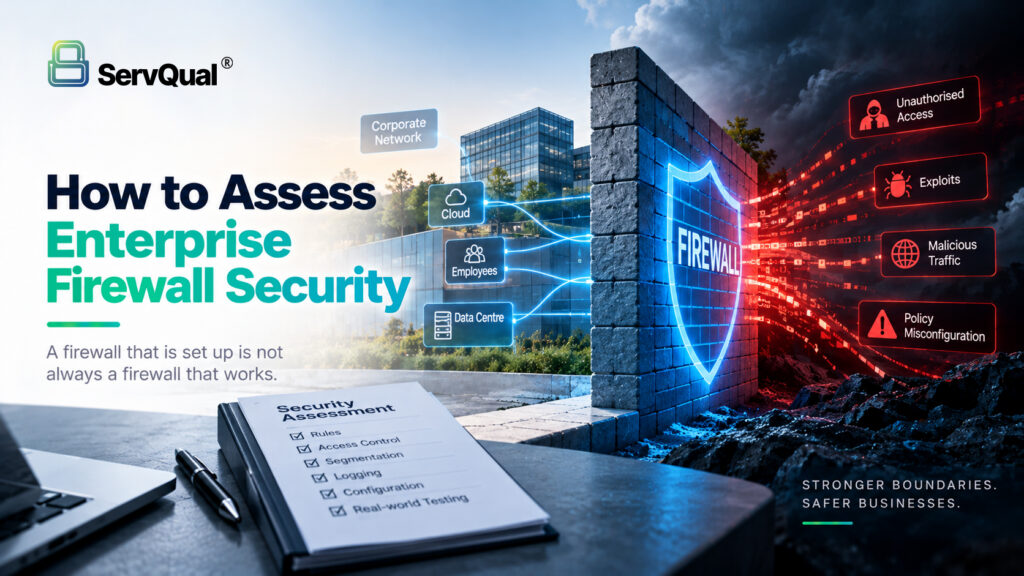
This gap between written policy and real behavior is why firewall assessment matters. NIST describes a firewall as a device that controls traffic between networks with different security levels, and its guidance covers policy, setup, testing and management [1]. Today’s networks also have VPN gateways, cloud security groups, traffic inspection settings and central management consoles. Firewalls and VPN devices at the network edge have appeared many times in CISA’s Known Exploited Vulnerabilities (KEV) list [6]. Zero Trust adds one more view. NIST SP 800-207 says to protect resources, not just network zones, and not to trust a device only because of where it sits on the network [2]. So a design that trusts everything “inside” is a design problem, not only a settings problem.
This article answers one practical question: Does each firewall enforce the access rules the organization thinks it has, and can the firewall itself resist misuse?
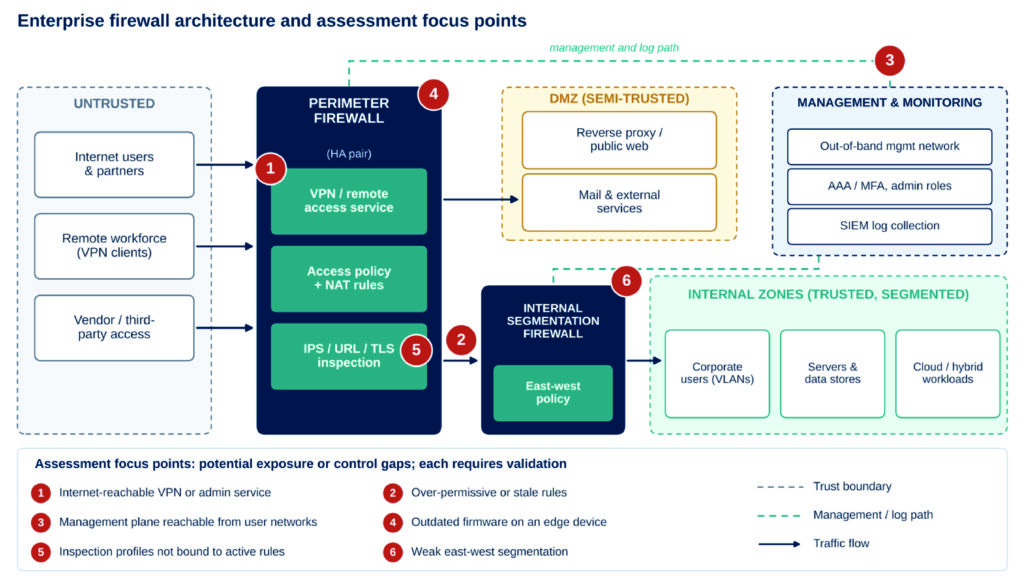
Visual 1 — Enterprise firewall architecture with trust boundaries. The numbered markers are places to test, not confirmed weaknesses.
Common Firewall Security Gaps
The items below are things to test, not automatic vulnerabilities. Each one becomes a finding only when evidence shows it creates real risk in this environment.
| Security gap | Why it matters | Recommended control |
|---|---|---|
| Rules that allow too much (any-to-any, wide subnets or services) | Wide rules let an attacker reach more systems after one break-in, and they weaken the separation between zones. | Give each rule only the access it needs, per zone, app and service. Add an owner and an expiry date to every allow rule [1]. |
| Hidden, duplicate or old rules | Rules that are never used, or are blocked by earlier rules, hide intent and make audits unreliable. They often outlive the project that needed them. | Check hit counts and rule order. Link rules to change tickets. Remove a rule only after testing the effect. |
| Admin access that is easy to reach | Admin pages open to user or Internet networks, shared accounts, or no multi-factor login (MFA) put control of the rules at risk. | Use a separate management network, limit source addresses, require MFA, and use central login with named admin roles [3][5]. |
| Old or unsupported firmware | Edge devices are often targeted. A reachable device is not always exploitable, but a version with known attacks needs fast action. | Keep a list of versions. Watch vendor alerts and the CISA KEV list. Set patch deadlines. Replace unsupported devices [3][6]. |
| Weak separation between zones | Loose rules between zones let one hacked machine reach many others. Trusting everything "inside" goes against Zero Trust ideas. | Block by default between zones. Put public servers in a DMZ (a buffer zone). Use finer separation where risk is high [1][2][5]. |
| Inspection set up but not used | IPS, URL or TLS inspection set to alert-only, or skipped by exceptions, gives a false sense of safety. | Confirm inspection profiles are applied to live rules. Review exceptions. Test with safe, approved test cases. |
| Weak logs and change alerts | Without logs of traffic, admin actions and rule changes, misuse cannot be spotted or traced. | Send logs to a SIEM (a central log system). Alert on rule changes and admin logins. Keep logs as long as policy requires [3][4]. |
What an Assessment Actually Checks
Discovery finds out what exists: devices, software versions, rules, zones, interfaces and admins. Validation proves what the firewall really does with traffic, and what an attacker could do from a known starting point. A settings review is discovery. So is a scanner report. Neither proves that the rules work in practice. A good assessment answers six questions:
- Scope: Which firewalls, backup pairs, virtual and cloud firewalls, management tools, zones and test points are covered, with written permission?
- Proof of weakness: Which setting, and which real behavior seen from a named test point, show that the weakness exists?
- Safe testing: Can we confirm reachability, rule behavior and software version with checks that cause no harm? Anything that could disrupt a VPN or admin service needs clear approval, and is not run on live systems by default.
- Conditions and trust boundaries: Which network zone, login, VPN access or timing is needed before the problem can happen?
- Real impact: What technical and business harm does the evidence support, and what is only a guess?
- A record others can trust: Device and rule ID, test point, steps, expected and actual result, logs and timestamps.
Exposure means a service or interface can be reached under some conditions. A vulnerability is a weakness that could break a security rule. Exploitability is whether, and how, that weakness can actually be used. Likelihood is how probable a harmful event is, and impact is the damage if it happens. A reachable admin page is an exposure. It becomes a rated finding only when the software version, settings and conditions support it.
Two Hypothetical Attack Scenarios
Both scenarios are hypothetical. They show what an authorized assessment would check inside the agreed scope. Exploit details are left out on purpose.
Scenario A — The forgotten vendor access rule
Starting point: An old project rule lets a vendor VPN network reach the server zone on any service. Vendor accounts are shared and have no MFA. Gap: a rule that allows too much and never expires, plus weak login control. Attack path (high level): An attacker gets vendor login details, for example from a breach at the vendor. They sign in, reach the server zone, look for hosts, and try to move sideways. Missing control: rule expiry and review, MFA, limits by application, and alerts on vendor-to-server traffic. Impact: file servers and internal services may be exposed. The business impact depends on the data in that zone. Fix: replace the rule with a time-limited path for one application through a jump host, require MFA with one account per person, and alert on new traffic from the vendor zone.
Scenario B — Exposed admin access on old firmware
Starting point: The firewall’s remote-access or admin service can be reached from the Internet, and its software is behind a vendor alert for a flaw on the CISA KEV list [6]. Gap: an exposed admin or VPN service plus late patching. Attack path (high level): An attacker identifies the service, checks whether the version and enabled features match the alert, and if they do, tries to get into the device to change rules or read stored settings and secrets. Missing control: a separate management network, a patch deadline, and alerts on configuration changes. Impact: the firewall can no longer be trusted, passwords and keys may leak, and there may be a path into the network. Fix: limit admin access to a separate management network [5], patch or upgrade, change secrets after any suspected break-in, and alert on configuration changes. During testing, the assessor confirms reachability, version and conditions. The assessor does not run exploit code on live systems unless the rules of engagement clearly allow it.
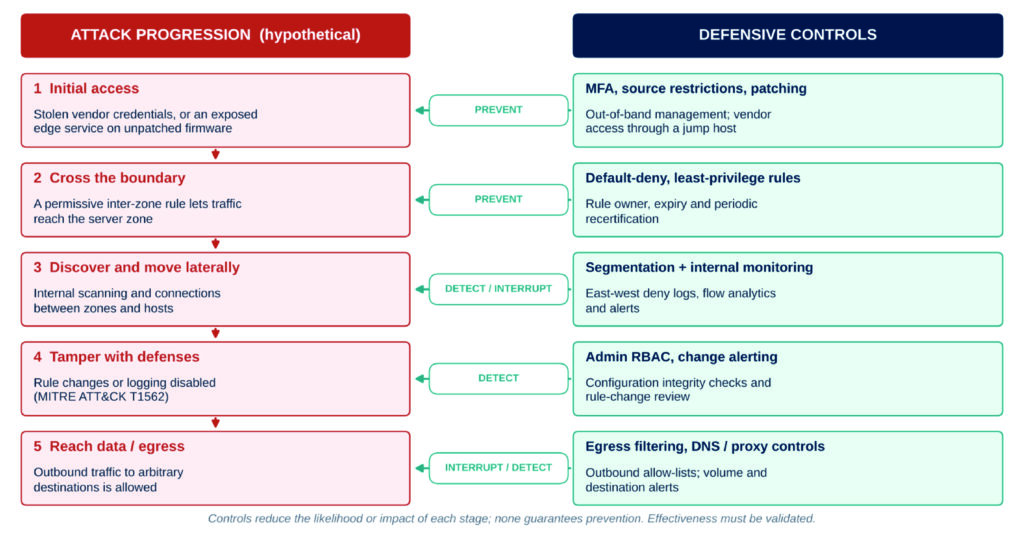
Figure 1 — Attack flow compared with security controls. Arrows show where a control can prevent, detect or interrupt each stage. Stage 4 matches MITRE ATT&CK Impair Defenses (T1562) [4].
Practical Assessment Methodology
Seven steps keep the work approved, based on evidence and easy to repeat.
| Phase | What happens | Output |
|---|---|---|
| 1 Scope | Get written approval. Define the firewalls, zones, test points, exclusions, change windows and rules of engagement. | Signed scope and rules of engagement |
| 2 Discover | Collect configurations, software versions, interfaces, routes, VPN settings, admin accounts and log settings. | Device and settings baseline |
| 3 Enumerate | Map zones, trust links, NAT, admin paths, inspection profiles and rule hit counts. | Zone and traffic map; rule review |
| 4 Assess | Compare with NIST SP 800-41 [1], CIS Controls [3] and vendor hardening guides. Flag loose, hidden and weak settings. | List of possible findings |
| 5 Validate | Confirm each possible finding with safe tests from approved test points: rule behavior, logins, reachability and version checks. | Proof that can be repeated |
| 6 Prioritize | Rank by exposure, exploitability, likelihood and business impact, using an agreed method. Lower the rating when the evidence is weak. | Risk-ranked findings list |
| 7 Fix / Retest | Recommend fixes, check them after the change, and record accepted exceptions and leftover risk. | Retest proof; leftover-risk record |
A confirmed breach at a Tier 1 vendor holding customer data scores 5 × 4 × 1.5 = 30 (P1); the same breach at a Tier 3 vendor with no sensitive data scores 10 (P2).
For P1 and P2 alerts, run a predefined playbook: confirm with the vendor’s named security contact, scope your exposure from the vendor record, contain by rotating credentials and revoking tokens, assess notification duties (CERT-In within 6 hours, DPDP, GDPR within 72 hours, DORA), track remediation and reassess the vendor.
Detection, Monitoring and Relevant Frameworks
- Logs: Collect traffic allow/deny logs, VPN and login events, admin logins, configuration changes and device health logs. Keep clocks in sync and set how long logs are kept (CIS Controls 8 and 13 [3]).
- What to alert on: rule changes outside change windows, new any-to-any allow rules, admin logins from unusual places, configuration exports, logging turned off, spikes in blocked internal traffic, and new outbound destinations. MITRE ATT&CK lists turning off a firewall or changing its rules as behavior you can detect [4].
- Access control: Give admins only the access they need, require MFA, and use central login, permission and audit records (CIS safeguard 12.5 [3]). Limit who can change firewall rules [4].
- Network design: Keep admin traffic on a separate management network. Separate zones with access control lists (ACLs), stateful inspection and DMZs [5].
- Reviews and repeat checks: Review rules and settings against vendor hardening guides on a schedule based on risk, and again after big network changes. Penetration testing is its own CIS control (Control 18 [3]).
- Which framework to use: NIST SP 800-41 [1] for firewall policy, setup and testing. CIS Controls 12 and 13 [3] for network devices and monitoring. NIST SP 800-207 [2] to check whether the design trusts devices because of their network location. One assessment at one point in time does not prove compliance or certification.
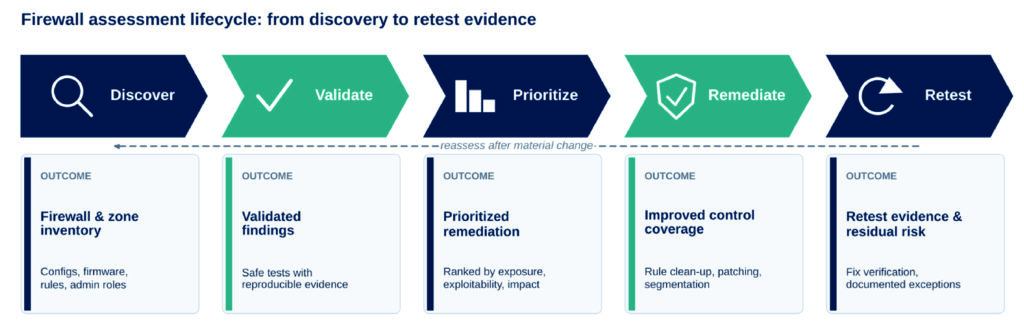
Visual 2 — Firewall assessment lifecycle and what each stage produces.
Security Checklist
- ☐ Review scope and authorization: devices, zones, test points and change windows are approved in writing.
- ☐ List every firewall and management tool, and compare software versions with vendor alerts and the CISA KEV list.
- ☐ Check that admin access is limited to a separate network, with MFA and named admins.
- ☐ Review rules: every allow rule has an owner, a purpose, an expiry date and a hit count.
- ☐ Find any-to-any, hidden, duplicate and disabled-but-present rules.
- ☐ Validate relevant security controls: test that traffic between zones is blocked where the policy says it should be.
- ☐ Confirm inspection profiles (IPS, URL, TLS) are applied to live rules.
- ☐ Check outbound rules, and confirm outbound traffic is limited to needed destinations.
- ☐ Confirm that rule-change, admin-login and deny logs reach the SIEM and trigger alerts.
- ☐ Document repeatable evidence, retest the fixes and record leftover risk.
How ServQual Can Help
- VAPT and network security assessments: testing of firewalls and network separation inside an agreed scope. We confirm findings with repeatable proof, rank fixes by risk, and retest after the fixes.
- Cloud and OT security assessments: review of cloud network controls and of firewall boundaries in industrial networks, where they apply.
- Red team assessments: a realistic, approved test of whether detection and response work across firewall boundaries.
- ISO 27001 audits and GRC services: checking network security controls against the standard, and helping plan risk-based fixes and record leftover risk.
- SUSAN, ServQual’s AI-assisted GRC platform: helps manage assessment evidence, audit readiness and ongoing compliance tracking for the controls in scope.
“A firewall rule list records choices made under pressure. An assessment shows which ones still hold up.”

Sameer Gupta
VAPT Engineer | ServQual
FAQ
Most frequent questions and answers
It is an approved review that checks whether firewalls enforce the intended access rules and whether the firewall infrastructure itself is secure. It combines configuration review with controlled validation and evidence-backed findings.
No. Scanners and configuration tools identify conditions, but they do not prove whether a weakness is exploitable or what its business impact is. Findings still need validation and context.
Common gaps include overly broad rules, stale or duplicate rules, exposed admin interfaces, unsupported firmware, weak segmentation, inspection profiles that are not actually enforced, and poor logging or change monitoring.
Admin access should be restricted to a separate management network, limited by source address, protected with MFA, and tied to named administrator identities with central logging and audit records.
Zero Trust does not assume that systems are trusted simply because they are inside the network. Firewalls can act as enforcement points, but identity, device health and resource-level access controls are also required.
The article recommends a risk-based schedule, for example annually, with additional reviews after major changes. Rule reviews and log monitoring should continue between full assessments.
It should validate scope, rule behavior, admin access, zone separation, firmware and version status, inspection profiles, logs, trust boundaries, business impact and repeatable evidence.
ServQual supports VAPT and Network Security assessments, Cloud and OT Security assessments, red team assessments, ISO 27001 and GRC services, and SUSAN for evidence, audit readiness and ongoing compliance tracking.
Validate What Your Firewalls Really Enforce
Assess firewall rules, segmentation, admin access, firmware, inspection and logging with ServQual Network Security and VAPT expertise.
Disclaimer: This article is provided for general Network Security and Cybersecurity guidance. Assessment scope, testing methods, remediation priorities and firewall controls should be adapted to the organisation’s architecture, approved rules of engagement, business context and applicable requirements.