Executive Summary
Microsoft 365 supports business-critical email, collaboration, identity and document workflows. Its security depends not only on available product features, but also on how those features are licensed, configured, monitored and governed. Gaps in authentication, mailbox rules, device compliance, external sharing or audit visibility can expose an organisation to account compromise, data leakage, fraud and operational disruption.
A Microsoft 365 security assessment is a structured review of tenant configuration, security controls, evidence and business risk. It compares the current environment with applicable Microsoft guidance, the CIS Microsoft 365 Foundations Benchmark, CISA Secure Cloud Business Applications (SCuBA) baselines and relevant NIST Cybersecurity Framework outcomes. The result should be an evidence-backed view of strengths and gaps, with a prioritised plan to address the most material risks. No single benchmark or score proves that an environment is completely secure or compliant.
Introduction
Cloud services change frequently as organisations add users, applications, devices, external partners and new ways of working. Security settings that were appropriate at deployment may become outdated, inconsistent or poorly understood. A practical Microsoft 365 security configuration review helps decision-makers understand whether the controls in place match the organisation’s risk, regulatory obligations and operational needs.
This checklist is designed for security leaders, IT teams and governance professionals. It focuses on how to assess, validate and improve controls, rather than simply listing product features.
Why Microsoft 365 Security Assessments Are Necessary
A tenant can have strong security products and still be exposed through weak configuration or incomplete operational processes. Examples include administrators with permanent excessive privileges, legacy authentication pathways, permissive external sharing, unreviewed application consent, inconsistent endpoint compliance, or alerts that are not investigated.
A structured assessment helps organisations establish a defensible baseline, identify high-impact weaknesses, clarify licence dependencies, and assign remediation ownership. It also supports audit preparation by linking each finding to evidence, a business consequence and a measurable corrective action. Assessment findings should be interpreted in context: an insecure setting is a control gap, while a confirmed incident requires separate investigation and evidence.
Common Security Gaps and Business Impact
Common areas for review include incomplete multifactor authentication (MFA) coverage, excessive administrator permissions, inactive accounts, risky application permissions, unsafe email forwarding, insufficient anti-phishing protection, unmanaged devices, anonymous file-sharing links, broad guest access, inconsistent data-loss prevention (DLP), and limited audit-log retention or alert response.
Potential consequences include business email compromise, unauthorised access to sensitive documents, malware delivery, fraud, regulatory exposure and longer incident recovery. These are risk scenarios, not claims that every tenant has these weaknesses. The assessment must establish whether each condition exists and how it affects the customer.
Assessment Scope and Methodology
Discovery and scope definition
ServQual should agree assessment objectives, business priorities, tenant boundaries, subscriptions and add-ons, key workloads, regulatory requirements, stakeholders, approved access and exclusions. Confirm whether the review is read-only, whether configuration changes are out of scope, and how sensitive evidence will be stored and shared.
Baseline and evidence collection
Review Microsoft Secure Score in the Microsoft Defender portal, relevant Microsoft 365 admin centres, available configuration exports and applicable benchmark results. Record the assessment date, licence context, evidence source and control owner. Secure Score is a useful prioritisation input, but Microsoft notes that its recommendations do not cover every attack surface and that not every recommendation is appropriate for every environment.
Configuration and control validation
Validate settings directly in the tenant and, where appropriate, compare them with the applicable CIS Microsoft 365 Foundations Benchmark, Microsoft security guidance and CISA SCuBA baselines. CISA’s ScubaGear can help assess supported cloud configuration baselines, but automated results still require review for scope, exceptions, applicability and business context.
Gap analysis and risk assessment
For each control, document the expected state, actual state, evidence, gap, plausible attack scenario, business impact and compensating controls. Assess likelihood and impact using a documented method that considers exposure, exploitability, affected users and data, existing detection, and recovery capability.
Risk prioritisation
Classify findings as Critical, High, Medium or Low using the agreed risk method. Prioritise issues that enable broad account takeover, privileged compromise, high-impact data exposure or weak detection of material threats. A benchmark deviation is not automatically a critical risk; its context determines priority.
Remediation planning and validation
Create actions with an accountable owner, target date, dependencies, expected outcome and validation method. Consider licensing, user impact, legacy workflows, emergency access, change windows and rollback plans. Test Conditional Access policies in report-only mode or with a controlled pilot where appropriate. Recheck the implemented setting, preserve suitable evidence, record residual risk and update the finding status.
Continuous improvement
Use periodic reassessment, Secure Score trend reviews, change reviews and incident lessons to maintain the improvement cycle. Set the cadence according to risk, tenant changes, exposure, audit obligations and internal policy. Significant acquisitions, identity changes, new workloads or security incidents may justify an earlier review.
Comprehensive Microsoft 365 Security Assessment Checklist
The table provides a practical starting point. Confirm current portal navigation and available features against the tenant’s actual service deployment and licence before testing.
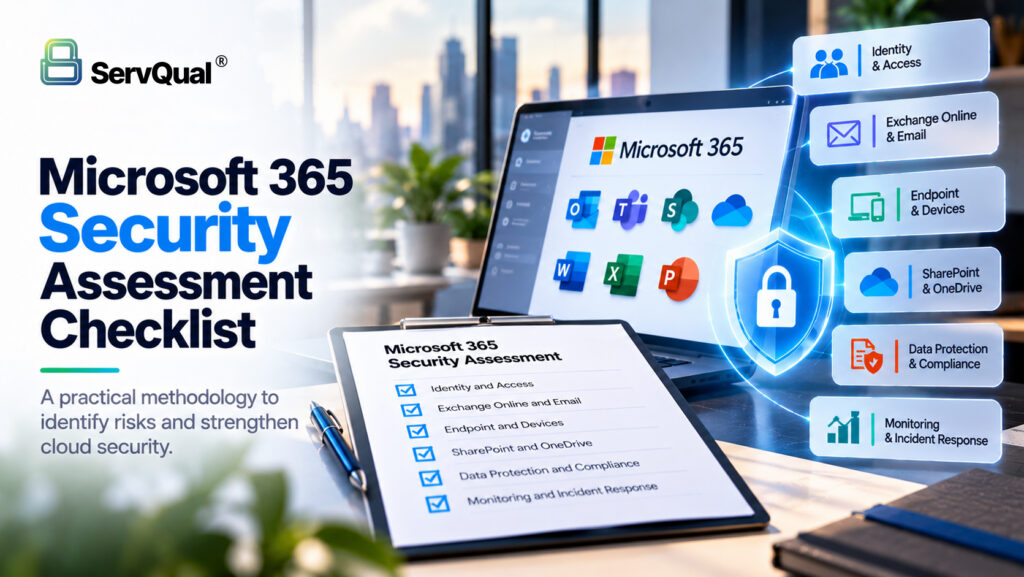
| Security domain | Control to assess | How to validate | Evidence to collect | Potential risk | Recommended remediation |
|---|---|---|---|---|---|
| Identity and access | MFA, Security Defaults or Conditional Access; legacy authentication; privileged roles; emergency accounts; stale users; guests; app consent; PIM and risk signals where licensed. | Review Microsoft Entra admin centre authentication methods, Conditional Access policies, sign-in logs, role assignments, users, enterprise applications and consent settings. | Policy exports/screenshots, sign-in samples, role and guest lists, exception rationale, licence inventory. | Account takeover, privilege abuse, persistence through applications or external identities. | Enforce appropriate MFA, block legacy pathways, minimise roles, review guests and app permissions, protect and test emergency accounts. Stage changes to avoid lockout. |
| Exchange Online and email | Anti-spam, anti-malware, anti-phishing, impersonation protection, Safe Links/Safe Attachments where licensed, SPF/DKIM/DMARC, auto-forwarding, mailbox permissions and mail flow rules. | Review Microsoft Defender and Exchange admin centres, email authentication DNS records, outbound forwarding controls, mailbox delegation and transport rules. | Policy exports, DNS lookup results, forwarding and permission reports, alert samples, approved exceptions. | Phishing, business email compromise, malicious attachments, data exfiltration or hidden forwarding. | Tune protection policies, configure domain authentication, restrict external forwarding, remove unjustified permissions and investigate suspicious rules. |
| Endpoint and devices | Intune enrolment, compliance policies, Conditional Access integration, Defender for Endpoint where licensed, antivirus, EDR, firewall, attack surface reduction, encryption and patching. | Review Intune device inventory, compliance and configuration reports, Defender device inventory, security baseline status and update reports. | Device compliance export, policy assignments, encryption status, endpoint alerts, exception register. | Unmanaged or vulnerable devices accessing company data; malware spread or data loss. | Define supported device standards, enforce access conditions where licensed, remediate noncompliance, enable suitable endpoint controls and track patch exceptions. |
| SharePoint and OneDrive | Organisation and site external sharing, anonymous links, guest access, sensitive-site permissions, labels, DLP and retention where licensed. | Review SharePoint admin centre sharing controls, selected site permissions, sharing reports, Purview policies and representative links. | Tenant/site settings, external-sharing report, permission samples, DLP alerts and approved sharing exceptions. | Sensitive files exposed externally, overbroad access, uncontrolled copies or retention failures. | Restrict anonymous links where appropriate, apply least privilege, review high-risk sites and external access, and use labels/DLP based on business requirements. |
| Microsoft Teams | Guest and external access, anonymous meeting join, presenter controls, app permissions, meeting data protection and retention. | Review Teams admin centre meeting, guest, external access and app policies; inspect SharePoint/OneDrive permissions for shared files. | Policy exports, guest/external access settings, app allow/block list, meeting policy samples. | Unauthorised meeting participation, risky integrations or file exposure through collaboration. | Align meeting and guest policies with risk, restrict unapproved apps, review exceptions and validate file permissions in connected storage. |
| Data protection and governance | Sensitivity labels, DLP coverage, audit logging, retention and records requirements, Compliance Manager assessments where appropriate. | Review Microsoft Purview solutions, policy scope, simulation/test results, audit search availability and retention configuration. | Label and DLP policy exports, test outcomes, audit-search examples, retention decisions and control mappings. | Sensitive data leakage, insufficient investigation evidence or failure to meet contractual/legal obligations. | Define data classification, test policies with business owners, confirm retention requirements and document the scope and limits of each compliance control. |
| Monitoring and response | Defender alerts, identity/email/endpoint investigations, notification routing, incident procedures, audit visibility, evidence preservation and SIEM integration where applicable. | Review Defender portals, alert queues, incident records, audit search, escalation runbooks and Microsoft Sentinel or other SIEM integrations if deployed. | Sample alerts and case records, escalation matrix, log-retention details, tabletop results and remediation tracking. | Delayed detection, missed escalation, incomplete investigations or repeat incidents. | Assign alert ownership, tune detections, test response procedures, verify log access and integrate relevant telemetry where justified. |
Practical Evidence Collection and Validation
Evidence should be sufficient to reproduce the assessor’s conclusion without collecting unnecessary personal or business data. Prefer least-privilege, read-only access where possible. Use approved exports, configuration records, policy screenshots and representative test results. Redact secrets, access tokens, message content and personal information that is not needed for the finding.
For each item, record the control objective, source portal or tool, collection date, scope, observed state, expected state, result, limitation and evidence reference. Confirm that screenshots show relevant context and that exported files are protected against unauthorised access. Do not run disruptive tests or change production settings without written approval.
Risk Classification and Remediation Prioritisation
Use a documented scoring model that combines likelihood and impact, then apply professional judgement and business context. Critical findings may involve credible paths to broad tenant compromise or severe exposure of highly sensitive information. High findings represent material exposure requiring prompt treatment. Medium findings require planned remediation, while Low findings may be addressed through routine hardening or monitoring. Define thresholds before scoring and record any accepted residual risk with an accountable approver and review date.
A useful finding record includes: unique reference, affected workload, control expectation, evidence, risk scenario, business impact, severity, recommendation, owner, target date, dependencies, validation result and residual risk. Avoid presenting unverified gaps as confirmed incidents.
How ServQual Helps Organisations Strengthen Microsoft 365 Security
A useful Microsoft 365 assessment should result in more than a list of technical observations. Organisations need to understand which risks matter most, which teams own the controls, what evidence supports each conclusion and how improvement will be verified. ServQual can help connect technical review with a practical improvement programme, subject to the agreed engagement scope.
Start with the business context
ServQual can work with IT, security, compliance and business stakeholders to establish the assessment scope, identify critical workloads and information, understand business and regulatory obligations, and agree how findings will be rated. This helps keep recommendations proportionate to the organisation’s size, exposure, operating model and risk tolerance.
Validate controls and document evidence
The assessment can examine identity and privileged access, email protection, endpoint management, collaboration sharing, data protection and security monitoring. For each in-scope control, the assessor records the observed state, expected state, evidence source, relevant limitation and potential business consequence. Where practical, assessment access should be read-only and least-privileged. Technical findings must be validated in the relevant Microsoft portals or approved assessment tooling rather than inferred from a score alone.
Turn findings into an owned remediation roadmap
ServQual can help translate technical gaps into a risk register and an action plan that identifies severity, recommendation, accountable owner, target date, dependencies and validation criteria. The roadmap should recognise licensing costs, user impact, legacy applications, change windows and rollback needs. Management can then make informed decisions about treatment, deferral or formally accepted residual risk.
Support implementation, governance and reassessment
Depending on the engagement, ServQual can support hardening activities, post-change validation, evidence preparation and periodic posture reviews. Useful outputs include an executive summary, technical evidence register, prioritised actions, remediation status and residual-risk record. These deliverables improve traceability and help teams demonstrate progress, but do not themselves confer certification or guarantee compliance.
ServQual support at a glance
Assessment planning: agree scope, boundaries, business priorities, access and assessment criteria.
Technical review: validate relevant Microsoft 365 settings and collect defensible evidence.
Risk and governance: explain likely business impact, record ownership and prioritise remediation.
Improvement support: plan safe changes, verify implementation and track residual risk.
Audit and management visibility: prepare scoped evidence and progress reporting for internal governance, customer assurance or audit discussions.
How SUSAN Can Support Assessment Governance
SUSAN can complement a consultant-led Microsoft 365 security assessment by supporting the governance activities around findings, evidence, control alignment and remediation. ServQual’s published materials describe SUSAN capabilities for cloud security validation, continuous evidence management, control mapping, risk visibility and remediation tracking. The precise modules, data sources and functionality available should be confirmed for the intended deployment before the engagement begins.
From technical finding to governed action
The assessment team can use an agreed governance workflow to ensure that each finding has a consistent record: what was checked, what evidence was reviewed, which control or requirement is relevant, why the gap matters, who owns the response and how closure will be verified. Where supported and configured, SUSAN can help organise the relevant evidence and status information so technical teams, risk owners and management work from a more consistent view.
| Assessment governance stage | Potential SUSAN support | Governance output |
|---|---|---|
| Evidence management | Organise relevant evidence, identify owners, review freshness and connect evidence with the control it supports, where these capabilities are enabled. | Traceable evidence register and review status. |
| Risk and gap tracking | Bring together the documented gap, affected area, risk rationale, priority and treatment decision where supported by the configured workflow. | Consistent risk and findings register. |
| Remediation management | Track action ownership, planned dates, status, evidence of completion and follow-up validation, according to the implemented module and process. | Action tracker with accountable owners. |
| Ongoing assurance and reporting | Help maintain visibility of evidence freshness, cloud-related findings, control status and remediation progress for governance reviews. | Management reporting and reassessment inputs. |
Governance boundaries and validation safeguards
SUSAN should be treated as a governance and assurance support layer, not as a substitute for hands-on technical validation, a formal audit opinion or a Microsoft licensing review. A finding should not be marked remediated only because an action was assigned or evidence was uploaded. The assessor or authorised control owner should verify the actual Microsoft 365 configuration and record the result. Before relying on automated collection or a native integration, confirm the exact data source, connector availability, permissions, module configuration, licensing and evidence refresh behaviour for the customer’s deployment.
Expected Assessment Deliverables
Depending on the agreed scope, deliverables may include an executive security assessment report, technical findings and evidence register, risk-ranked gap analysis, Secure Score observations, benchmark-alignment summary, prioritised remediation roadmap, licensing and control-dependency observations, remediation validation record, residual-risk register and reassessment recommendations.
Implementation Challenges and Best Practices
Security improvements can disrupt business processes if deployed without planning. Common challenges include mixed licences, legacy applications, service accounts, external partner workflows, unmanaged devices, inconsistent data ownership and incomplete documentation. Before enforcing a change, identify affected users and workloads, confirm dependencies, communicate the impact, test with a pilot group, document exceptions and maintain a rollback route.
Use least privilege for assessment access, preserve a clear evidence trail, involve business owners in data-sharing decisions, and validate controls after deployment. Treat benchmark alignment as a guide, not a substitute for risk judgement. Security controls should be effective, supportable and proportionate to the organisation’s operating model.
“A Microsoft 365 security assessment should produce more than a list of technical observations. It should connect configuration evidence to business risk, ownership and measurable remediation.”

Rohan Kanthe
Sr. IT Engineer | ServQual
FAQ
Most frequent questions and answers
A comprehensive assessment typically reviews identity and access management, email security, endpoint protection, SharePoint and OneDrive sharing controls, Microsoft Teams configuration, Data Protection, compliance settings, logging, monitoring and Incident Response capabilities.
In most cases, assessments can use read-only access and evidence collection methods that do not affect production services. Any testing or configuration changes should be planned, approved and performed through controlled change management.
No. Microsoft Secure Score is useful for tracking recommended actions and posture trends, but it does not cover every attack surface and does not replace manual validation, business-context analysis or Incident Response review.
No. Available controls depend on subscriptions, add-on licences, tenant settings and deployment. Security recommendations should therefore be validated against the organization’s actual Microsoft 365 licensing and configuration.
Key areas include MFA, Conditional Access, legacy authentication, privileged roles, emergency accounts, stale users, guest access, application consent, PIM and identity risk signals where available.
The assessment should review anti-spam, anti-malware, anti-phishing, impersonation protection, Safe Links, Safe Attachments where licensed, SPF, DKIM, DMARC, forwarding controls, mailbox permissions and mail-flow rules.
Organizations should prioritize findings based on risk, assign accountable owners, implement remediation, validate completed changes, document residual risk and schedule future reassessments.
Strengthen Your Microsoft 365 Security Posture
Identify configuration gaps across identity, email, endpoints, collaboration, data protection and monitoring before they become material security risks.
ServQual helps organizations assess Microsoft 365 controls, validate evidence, prioritize findings and build a practical remediation roadmap aligned with business risk.
Disclaimer: This article provides general Microsoft 365 Security guidance and does not constitute legal, regulatory or environment-specific security advice. Microsoft features, licensing, portal navigation and benchmark versions may change. Controls and recommendations should be validated against the organization’s actual subscriptions, configuration, risk profile and business requirements.