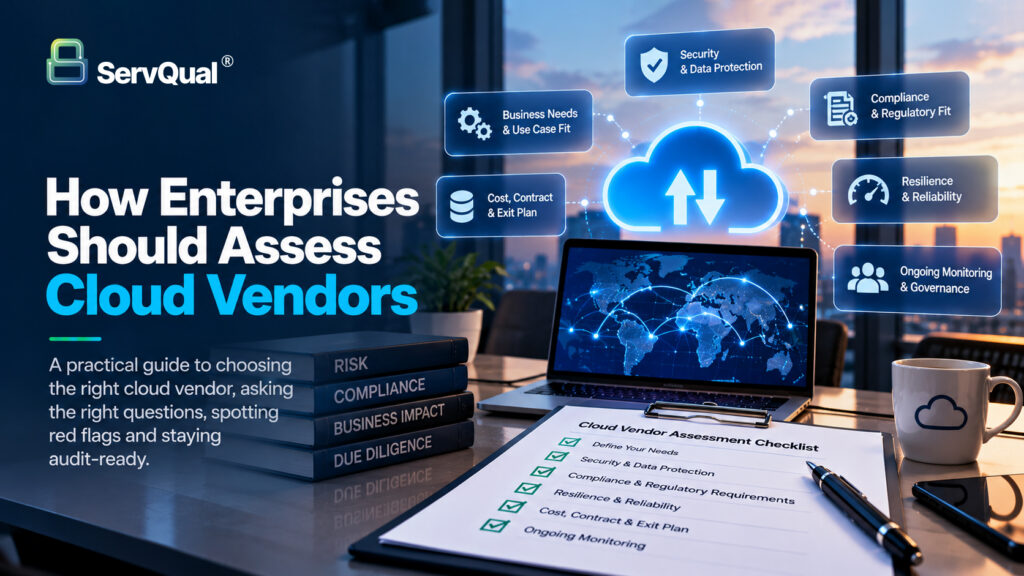
Choosing a cloud vendor is one of those decisions that feels small on the day you sign and enormous two years later. This blog walks through, how a large enterprise can assess cloud vendors properly: what to look at, what to ask, what should make you pause, and how to keep checking once the contract is signed.
A familiar story
Picture a growing company with several business units. The finance team needs a new analytics platform, so they pick a cloud vendor that looks great in the demo. The pricing is friendly, the sales team is responsive, and the whole thing is live in three weeks. Nobody from security or legal is in the room, because the project is “just a pilot”.
A year later, that pilot holds customer data. Two other teams have connected their own tools to it. Then a big customer sends a due diligence questionnaire asking where their data is stored, who can access it, and what happens if the vendor has an outage. Nobody can answer with confidence. The contract is signed, the data is inside, and moving out would take months to complete.
Nothing dramatic went wrong here. No breach, no headline. The company simply made an important decision without asking the important questions first. That is the most common way cloud vendor risk shows up, and it is almost always avoidable.
What this blog covers?
We will start with why vendor assessment is a business decision and not an IT checkbox. Then we will go through what to look at: your own needs first, then security, compliance, resilience and the exit plan. After that, we will cover the questions worth asking, the red flags worth noticing, a simple way to score and finalize vendors, and how to stay audit-ready over time. You do not need a technical background to follow along. Just keep reading the entire blog and you will be all set.
Why this is a business decision, not an IT checkbox?
A cloud vendor is not just a tool you plug in. It becomes part of how your business runs. It stores your data, powers your processes, and in many cases touches your customers directly. If it fails, you fail with it, and your customers will not care whose fault it was.
That is why vendor assessment cannot sit only with the IT team. Security needs to look at how data is protected. Legal needs to read the contract. Procurement needs to understand cost and exit terms. The business unit that wants the service needs to explain what it will actually use it for. When any one of these voices is missing, a gap opens up, and gaps are where problems live.
There is also a very practical reason to care. Regulators, auditors and your own customers now expect you to show that you checked. It is no longer enough to say “the vendor is well known”. Being able to say “here is what we asked, here is what they answered, and here is how we decided” is what builds trust. In India, for example, the Digital Personal Data Protection (DPDP) Act has made it clear that the organisation collecting personal data stays responsible for it, even when a vendor handles it on their behalf.
A big name is not a risk assessment:
It is tempting to relax when the vendor is a household name. Large providers usually do invest heavily in security, and that counts for something. But a big brand does not tell you whether the service is configured safely for you, whether it fits your regulatory needs, or whether the specific product you are buying has the same controls as the flagship one. Reputation is a starting point for the conversation, not the end of it.
Start with yourself, not the vendor:
Most assessments begin with the vendor’s brochure. A better place to begin is a mirror. Before you compare anyone, get clear on what you are actually asking the vendor to do for you.
Ask four simple questions:
- What data will go there?
Marketing images and employee payroll are very different things. Customer personal data, financial records and intellectual property deserve a much deeper look than public content. - How important is this service?
If it went down for a day, would anyone notice? If it went down for a week, would revenue stop? The more critical the service, the harder you should look. - Who will connect to it?
In a large organisation, one tool rarely stays with one team. Think about which business units, which employees, and which other vendors will have access. - Which rules apply to us?
Your industry, your customers and the countries you operate in decide what the vendor must be able to prove.
Sort vendors by how much they matter.
Not every cloud vendor needs the same level of scrutiny. A simple three-tier approach saves a lot of time. A high-risk vendor handles sensitive data or supports something critical, and gets the full assessment. A medium-risk vendor touches limited data or supports a non-critical process, and gets a lighter review. A low-risk vendor handles nothing sensitive, and a short questionnaire is enough.
This tiering also protects your team from burnout. If every vendor gets the same heavy process, the process becomes a bottleneck, and people start finding ways around it. That is how “shadow IT” starts, when a team quietly signs up for a cloud service without telling anyone.
- Watch out for the ones nobody told you about
In big companies, the biggest surprise is often how many cloud services are already in use. Before assessing new vendors, take a quiet inventory of the ones you already have. You may find several that were never reviewed at all.
Looking at security: what is actually behind the promise
Every vendor says “we take security seriously”. Your job is to find out what that means in practice. You do not need to be an engineer for this. You need to ask for evidence, and know roughly what good evidence looks like.
- Independent proof, not just claims
Start with third-party reports and certifications. ISO 27001 certification and SOC 2 reports are the common ones. They show that an independent auditor has looked at the vendor’s controls. Two things are worth checking.
First, the scope: does the certificate cover the exact service and locations you will use, or just part of the company?
Second, the date: is the report recent, and were there any exceptions noted?
- Who can see and touch your data?
Ask how the vendor controls access. Does it use multi-factor authentication for its own staff? Are administrator rights limited and logged? Can the vendor’s employees see your data, and under what conditions? Also look at what you get on your side: role-based access, single sign-on and activity logs matter a lot when many business units share one platform.
- Protection of the data itself
Check that data is encrypted both while it is stored and while it moves. Ask who holds the encryption keys, and whether you can bring your own. For sensitive data, that last point can make a real difference.
How they behave when things go wrong?
No vendor is perfect, so how they handle problems tells you more than how they market themselves. Ask about their incident response process, how quickly they will notify you of a security event, and whether they have been through a serious incident before and what they changed afterwards. A vendor who answers openly is usually safer than one who claims it has never had an issue.
- Their own suppliers:
Your cloud vendor probably relies on other vendors too, such as data centres, support providers and software components. Ask who these are and whether they are held to the same standards. Risk travels down the chain, and so does your responsibility.
Compliance, data location and who is responsible for what
Security asks “is it protected?”. Compliance asks “can you prove it, and are you allowed to do it this way?”. Both matters, and they are not the same thing.
- Know where your data lives:
Ask exactly which countries and regions will store and process your data, including backups and support access. Some regulations and customer contracts limit where data can go. Under the DPDP Act, organisations that collect personal data remain accountable for how it is handled, so you need to know whether your vendor can support your obligations, such as handling data requests and reporting breaches on time.
- The shared responsibility surprise:
Here is something that catches many teams out. In the cloud, security is shared. The vendor secures the underlying infrastructure. You are responsible for how you configure and use the service: who has access, which settings are turned on, and what data you put there. Many well-known cloud data exposures were not the vendor being hacked. They were a setting left open by the customer.
So, when you assess a vendor, also ask yourself an honest question: do we have the people and processes to use this safely? A very secure platform can still be misused.
- Check what your industry expects:
Depending on your sector, you may need to meet specific requirements. Financial services, healthcare and listed companies each have their own expectations. Ask the vendor which of these it supports, and ask for proof rather than a yes or no. If the vendor will not share audit reports, usually under an NDA, treat that as a signal worth noting.
- Contracts are part of compliance:
The contract is where promises become obligations. Look for clear terms on data ownership, breach notification timelines, your right to audit or to receive audit reports, how subcontractors are handled, and what happens to your data when the contract ends. If a term matters to you, get it in writing. A verbal assurance from a salesperson will not help you in an audit.
- Resilience, SLAs and the way out:
This is the part people skip, because nobody likes planning for a bad day or a breakup. It is also the part you will be most grateful for later.
- What the uptime promise really means:
Vendors often quote availability as a percentage, like 99.9%. It sounds impressive, but it helps to translate it. 99.9% still allows several hours of downtime in a year. Ask what the service level agreement (SLA) actually covers, how downtime is measured, and what you get if the vendor misses the target. Often the remedy is a small service credit, which will not cover the cost of your business being stuck.
Also ask about backups and disaster recovery. How often is data backed up? Where are the backups kept? How long would it take to restore, and has the vendor actually tested it? A recovery plan that has never been tested is a hope, not a plan.
- Do not depend on one thing:
Think about concentration. If your core operations, your customer portal and your backups all sit with the same vendor, one bad day affects everything. You do not have to spread everything across providers, which has its own cost and complexity. You just need to know where the single points of failure are, and make a deliberate choice about them.
- Plan the exit before you enter:
The time to ask how you leave is before you sign. Ask yourself and the vendor:
- Can we export our data in a standard format, and how long will it take?
- Will the vendor delete our data when we leave, and give us written proof?
- Are there fees for moving out, and are any of our tools built in a way that only works on this platform?
- What happens to our service if the vendor is acquired, changes its pricing or shuts the product down?
Vendor lock-in is not always bad. Sometimes using a platform’s special features is worth the trade-off. The point is to make that choice with your eyes open, rather than discovering it during renewal.
Questions to ask, red flags to notice, and a simple way to compare
By now you have a long list of things to check. Here is how to turn it into something a busy team can actually use.
Questions worth asking every high-risk vendor:
- Which exact service, region and data centres will hold our data?
- Can you share your latest SOC 2 report or ISO 27001 certificate and its scope?
- Who on your side can access our data, and how is that access approved and logged?
- How quickly will you tell us about a security incident, and what will you tell us?
- When did you last test your backup and recovery process, and what was the result?
- Which subcontractors process our data, and where are they located?
- If we leave, how do we get our data back, and how do you prove it was deleted?
- How do you help us respond to customer audits and due diligence requests?
Red flags that deserve a pause:
None of these automatically rules a vendor out, but each one should lead to a follow-up conversation.
- Vague answers, or answers that change depending on who you speak to
- Refusing to share any audit evidence, even under NDA
- Certifications that cover only a small part of the service you are buying
- No clear process for notifying customers about incidents
- A contract that makes it hard or costly to get your data out
- Pressure to sign quickly, or to skip the security review “just this once”
A simple scorecard:
| Area | Example weight | What a strong score looks like? |
|---|---|---|
| Security controls | 30% | Recent independent reports, clear access and encryption practices. |
| Compliance and data location | 25% | Meets our regulatory needs, clear data residency, usable contract terms. |
| Resilience and support | 20% | Tested recovery, realistic SLA, responsive incident handling. |
| Exit and portability | 15% | Easy export, deletion proof, no unusual fees. |
| Cost and fit | 10% | Fair pricing that matches how we will really use it. |
After you sign: staying audit-ready:
Assessment is not a one-time event. A vendor that looked solid in January can change its ownership, its sub-suppliers or its security practices by December. The most mature organisations treat vendor assessment as a cycle, not a gate.
Keep it light but regular
- Review on a schedule – High-risk vendors should be reviewed at least once a year. Medium-risk vendors can be reviewed less often.
- Collect fresh evidence – Ask for updated certifications and audit reports when they renew, and note any exceptions.
- Watch for changes – A new data centre region, a merger, a major outage or a security incident at the vendor should trigger a quick re-check.
- Track who is using what – In a large organisation, new teams and integrations appear over time. Make sure access and scope still match what was approved.
- Keep one record – Store the questionnaire, evidence, decision and owner for each vendor in one place, not scattered across inboxes.
Why this pays off at audit time?
When an auditor asks how you manage your cloud vendors, you want to answer in minutes, not weeks. A clear inventory, a risk tier for each vendor, dated evidence and a named owner is usually most of what they are looking for. Organisations that keep this record as they go tend to find audits far less stressful than those who rebuild it in a rush.
Customers are asking too:
Your own customers are increasingly sending due diligence questionnaires, and they ask about your vendors as well as your own controls. If you can show that you assess your cloud providers carefully and keep checking, you answer those questions with confidence. In a competitive deal, that can make the difference. And for organisations that handle personal data, being able to show that your vendors are managed also supports your DPDP obligations.
Give it an owner:
The quiet reason many programmes fade is that no one owns them. Decide who is responsible for the vendor register, who chases evidence, and who has the authority to say “not yet”. It does not need to be a big team. It needs to be a named person with support from the business.
Bringing it together:
Assessing a cloud vendor well comes down to a few habits. Know what you are trusting them with. Match the depth of your review to the risk. Ask for evidence instead of reassurance. Plan your exit before you need it. And keep checking after the contract is signed, so you are never surprised by your own vendors.
None of this needs to slow your business down. Done early, it takes a few conversations. Done late, it takes an audit finding, a worried customer or an outage to force the same conversations at a much higher cost.
Where to start this week?
If you do only three things, make them these. List the cloud vendors you already use, including the ones teams signed up for on their own. Sort them into high, medium and low risk. Then pick your three highest-risk vendors and ask each one for its latest audit report and its data location details.
Let's talk it through:
With customer due diligence requests, audits and DPDP obligations all increasing, waiting for the next questionnaire to land is a risky plan. If you would like a friendly, no-pressure conversation about how your organisation reviews its cloud vendors and where the gaps might be, get in touch with the ServQual team and book a short discovery workshop. We will help you see where you stand and what to tackle first, including how to become audit-ready for your vendor reviews.
“A big name is not a risk assessment. Reputation is a starting point for the conversation, not the end of it.”

Mousami Das
Business Operations and Executive Assistant | ServQual
FAQ
Most frequent questions and answers
Enterprises should assess security controls, compliance requirements, data location, access controls, resilience, Incident Response, contractual obligations, subcontractors, portability and exit arrangements.
No. Independent certifications and audit reports are useful evidence, but enterprises should also check scope, date, exceptions and whether the evidence covers the exact service and locations being used.
Organizations should know which countries and regions store and process their data, including backups and support access, because regulatory obligations and customer contracts may restrict or condition where data is handled.
Key controls include MFA, privileged access restrictions, activity logging, RBAC, SSO, encryption at rest and in transit, key management, Incident Response and security monitoring.
A risk-based scorecard can consider security controls, compliance and data location, resilience and support, exit and portability, and cost and business fit. Critical weaknesses should be able to stop approval even if the overall score appears acceptable.
The article recommends reviewing high-risk vendors at least annually and reassessing when major changes occur, such as new data locations, mergers, outages or security incidents.
Exit planning helps organizations understand data portability, deletion evidence, migration fees, platform dependency and what happens if the vendor changes pricing, ownership or discontinues the service.
Strengthen Your Cloud Vendor Risk Management
Assess cloud vendors based on security, compliance, resilience, data location, contractual obligations and exit readiness before risk becomes embedded in your environment.
ServQual helps organizations review vendor risk, identify control gaps, structure due diligence and maintain audit-ready evidence for third-party risk decisions.
Disclaimer: This article provides general cloud vendor risk and third-party risk management guidance. Vendor assessment requirements depend on the organization’s regulatory obligations, risk appetite, data sensitivity, contractual requirements and service criticality.